


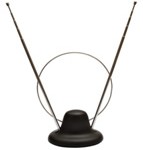
 As we enter the first weekend in the U.S. without analog television signals, you may be having some trouble getting good DTV reception or receiving certain channels. Here are a few tips to help you get the most available channels and best quality HD over-the-air.
1. Make your cables are all tight and secure. Sometimes a loose coaxial cable will cause your reception to flicker or drop out.
2. Make sure you have an appropriate antenna. Older rabbit ear antennas will pick up VHF stations but DTV uses both VHF (for channels 2-13) and UHF (for channels 14-51). If you have an antenna with both rabbit ears and a loop, you are using the right antenna.
3. Check for obstructions. Indoor antennas tend to have the most difficulty getting reception. Try moving the antenna to slightly different positions, like closer to an exterior wall and rescan for channels.
4. Try using an outdoor antenna. Outdoor and especially rooftop antennas have less obstructions and therefore can get cleaner reception. If you can get some channels strongly but others come in weak, try using a rotating antenna which can turn in the direction of broadcast stations.
5. Check signal strength on your converter box. Many digital-to-analog set-top boxes feature a meter to measure the strength of the digital signals. You can usually access this through the menu options.
6. Find out where your local broadcast stations are located. By using the FCC’s DTV reception map you can find out which stations near your zip code have strong signals and which are moderate, weak, or provide no signal.
7. Finally, scan and rescan. After you adjust your antenna, you should rescan for the digital channels. Moving the antenna just slightly can make a world of difference.
If you need to purchase an antenna, Amazon has a large selection










Most TV devices/receivers today are designed for an amplified signal from a cable box, satellite receiver, etc. Somewhere around 70 millivolt. An antenna, however, only supplies about 1/10,000 of that — 7-20 microvolt. Thus, you are probably going to need some amplification.
The new digital TV is also very directional (as are all UHF radio devices) so, like my friend, he can use the remote to change channels but he has to get up to turn the antenna every time he changes channels anyway. The solution is what is termed a SMART Antenna – expensive and not guaranteed to work.
Discone makes a wonderful police scanner antenna with gain. I’m looking to try one of those but, if I’m in a dead spot (see below), the best antenna won’t do any good.
With digital TV, you either get it or you don’t. Most modern receivers won’t turn on the audio if the picture is poor and with digital, you either get no picture, a broken up or freezing picture or a good picture. Lightening will mess up a digital picture, by the way. If you get a good picture, you should also have sound.
Just like Cell phones, DTV is subject to dead spots. These are areas where signal does not go. Either by cancellation or blockage, signal levels are insufficient to capture. I live in one. In this case, while you could get analog TV on lower frequencies, nothing will help for DTV. My only solution is to buy cable (Comtrash has already ripped me off and lied to me once so they’re out) or subscribe to Dish/EchoStar or Direct TV satellite services.
So, I’m sticking with the option of No TV! Since we rarely watch it anyway, there is no reason to pay for a lot of junk to watch even more junk.
try http://www.CheckDTV.com/ they may have better signal info than the FCC
dude that is wild. I wonder if you are getting them from some other broadcast station and the analog is just skipping over
I live in Kingman Arizona! (Home of Timothy McVeigh) and the citizen militias are in an uproar. They are vowing all sorts of actions over the loss of TV in an astounding amount of area now without TV in any form. The Indians are also raging over the fact that over 90% of reservations are now without TV. You have to understand that Arizona is a largly rural state with very few cable services in remote areas. Only the major cities were affected by the digital transition in this state , leaving the majority of the state without digital transmissions. This is the case in a large amount of western states. One of the options that is being ranted about by the militia is the destruction of cell towers, satellite dishes, cable companies or conversly jamming signals to cable companies. The purpose being a tough love example to everyone else in the area about what it is like without TV. There are even more radical approaches being considered by hate groups, in fact the shooting of a guard in a jewish museum is being called the opening volley of many acts of political violent actions. Some are scheduled for the next two days, but the majority of actions seem to be set for Monday in order to get the most TV coverage possible. Irronic since many won’t be able to watch the TV news that comes out.The problem with digital signals is that they are line of sight and any obstruction can cut your signal, also distance causes loss of signal, Arizona has both problems with a mountainous terrain and vast areas of space, I checked this morning and we don’t have any digital signals from any digital TV stations whatsoever in my area. We do still have some weak analog signals from some small power analog repeaters, but they snap in and out because they have a weaker digital signal coming to them from their receiving antenna on the top of a mountain. This situation effects millions of people in Arizona alone. The day the TVs went black!
I want to mention that I don’t agree with violence in any form and suspect that the anger and frustration is being taken advantage of by people out to make a buck. The local gun dealers have been selling massive amounts of guns to the indians
i stay in savannah georgia and i still can pick up 2 analog channels( TBN and a spanish channel).their still broadcasting in analog,mabe they are low power transmission im not sure.the FCC DTV reception map is also wrong because they show that 2 PBS staions is transmitting over the air in savannah they even show that one of them is transmitting a strong signal but that information is wrong.after calling those two stations they told me that they are not broadcasting over the air in savannah.