

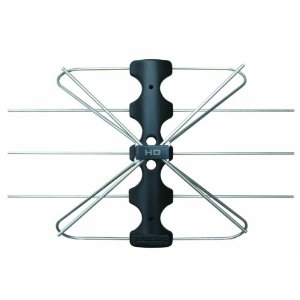
 While the CEA would love for over-the-air television signals to end in favor of viewers having to pay for service, the National Association of Broadcasters is still on the consumer’s side, arguing that the percentage of homes tuning into OTA signals is currently over 14-percent* and still growing. Still, many HDTV owners aren’t aware of the DTV spectrum which provides free over-the-air standard definition (SD) and high definition (HD) channels from local broadcasters. So how do you get HD channels without a cable box?
First, we assume you have an HDTV. HDTVs can display both SD and HD but non-HDTVs can only display SD signals. Second, most HDTVs come with a built-in digital tuner. With a tuner, all you need to do is plug an antenna into the coaxial connection on the back of your TV (which might be labeled “antenna” or “ANT”). Then, switch the input on your TV (which might be labeled “Source” on your remote) until you locate the coaxial input. This would be an input other than HDMI, Component, or Composite. If you don’t have a digital tuner you’ll need an external box. (More on DTV Tuners here.)
Once you’ve got your antenna hooked up, and your TV source from coaxial is selected, you should be able to scan for digital signals. Some TVs may automatically start searching, while others may require you to manually access the TV’s menu and find the option to “Auto Program” or “Auto Scan” for channels. When selected, the TV will scan through all the available digital signals and store them into memory. Usually, the HD channel takes up the first number in the channel’s digital spectrum. For example channel 7.1. The channels may also include sub-channels such as 7.2, 7.3, etc. which your tuner will find automatically. The sub-channels are sometimes simultaneous feeds of programming or completely different shows offered by the broadcaster.
The negatives? You won’t find as many channels over-the-air as you would with a cable or satellite TV provider — not even close. For example, you won’t be able to get national premium channels such as HBO, NBA TV or TNT. Some areas are also subjected to interference or are too far from broadcast facilities to receive strong signals.
However, the free over-the-air signals offer superb quality, both in video and audio. The video images may be broadcast in either 720p or 1080i and audio in Dolby Digital, depending on the network and broadcast facility. You might find the audio to be lower in volume than through a cable box, simply because it hasn’t been “normalized” to a level matching the rest of the channels.
You can also schedule and record over-the-air channels using hardware/software combinations such as a TIVO DVR or USB TV Tuner that plugs into your PC such as the Elgato EyeTV One.
*Knowledge Networks via NAB









I pretty much pay comcast solely to watch channel 2 on Sundays for football and anime hour, and am kicking myself in the ass right now for paying them so much over the last four years. One or two out of those years I might have made some use of the other channels but for probably 30 or more payment cycles Ive paid for service that got utterly neglected. Probably $600 or so down the drain.
Going to antenna now and not paying service providers another dime until they simply give more channels for the amount of money they charge. I know its a free country but the basic cable packages most comnpanies offer and the amount and way they setup their billing seems criminal to me. good bye
Comcast has recently supplied DTAs (digital tuning adapters) to current customers in order to tune in acomplete spectrum of channels, however the DTA is incapable of translating an HD (high definition) signal. The HD signal is still carried in your cable, but you cannot tune it through the DTA. If you install an A/B switch to bypass the DTA, you can then tune in a limited number of channels (usually your local network affiliates and weather channel) that are carried in HD on your cable. It is really only of value when watching sports on network stations, but it makes a huge difference for viewing football games.
thanks for the comment. if the DTAs are incapable of translating HD signals, this is truly disappointing.
Most HDTVs have a coaxial input. So just get an antenna hooked up for over the air HD and switch inputs on the TV. Or get a digital tuner if your set is lacking one.