

Getting HD channels for free is not rocket science. And, it has nothing to do with an illegal cable hook-up that your neighbor can set up for fifty bucks. Television, in case anyone forgot, is actually free. Way, way, back before cable and satellite, before the HBOs and the Showtimes, people used to watch television without subscriptions. They just sat through the commercial breaks (which we still do by the way), and those commercials paid for the networks to run.
Today many channels are still broadcast over-the-air and simple to tune-in to. All you need is an antenna and HDTV. That’s it. And, for the tiny percent of HDTVs out there without built-in digital tuners, you’ll need a digital converter box — the same as those offered in the DTV program. If you bought a television after Mar. 2007, it will most likely already have a digital tuner because at that point it became a requirement of televisions sold in the United States. (Refer to dtv.gov for more information on digital television.)
Here’s what you need to receive free HD channels over-the-air (OTA)
Antenna
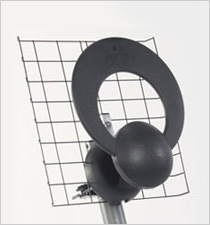
You’ll want an antenna capable of both UHF and VHF reception. These antennas may look like a combination of both rabbit ears and a circular antennas, or like the ClearStream antenna pictured above. Try to determine whether you need a uni-directional or multi-directional antenna. If the broadcast stations are fairly close to each other, you maybe able to use a uni-directional. If the stations are scattered around 360°, use a multi-directional. Amazon has all kinds of HD antennas to choose from.

Broadcasts
Major networks ABC, CBS, NBC and FOX all broadcast over-the-air (OTA). The high-definition signal, sent simulaneously with the standard-definition (SD) signal, can usually be found on the first sub-channel of the broadcast number. For example, the high-def signal for channel 5 would most likely be 5-1. Other broadcasts, including the SD version and other programming may be found on 5-2, 5-3, etc. Some of the networks are making use of those extra bands, while some of the bandwidth is just being wasted.
Reception
Choose an antenna, or experiment with different types, to see which gets the best reception in your house or office. Move the antenna around to see where it picks up the most signals. Obstructions such as brick walls are not going to help your signal strength. If possible, get a rooftop or outdoor antenna that can bypass some of those obstacles. You should also consider choosing between a long range, medium range, or short range antenna depending on how far away broadcast facilities are.
Scanning
Sometimes scanning for the digital HD signals is the most frustrating part. If you find you don’t have good reception move your antenna and re-scan. Make sure you are scanning for digital channels only, as many tuners will scan for both analog and digital signals. Scanning for analog after June 12, 2009. Try doing this a few times to find the best positioning. For the best positioning of your antenna, refer to AntennaWeb for local broadcast facilities and which way to direct your antenna.
Need to purchase a DTV converter? View a list of DTV converters available at Amazon.
Free TV on your PC
There are also devices to watch TV for free over-the-air on your PC. USB dongles such as the Elgato EyeTV allow you to watch TV, schedule and record shows all on your personal computer. The high-definition broadcasts are just as available on your PC as they are for your TV. Cell phones are also coming out in 2010 that can receive local TV signals through what is called MobileDTV. Although you wouldn’t actually call those signals HD, the concept of having free digital video streaming over-the-air is still exciting.
[amazon_link asins=’B073ZXRD1X,B017JEF126,B00DNJZ58M,B0024R4B5C’ template=’ProductGrid’ store=’API-user-hdr’ marketplace=’US’ link_id=’dfaff4ee-d06e-11e7-a9d9-334cfee8a6d7′]









home warranty queensland…
Getting free HD channels over-the-air – HD Report…
[…] cable & satellite TV provide almost no added benefit to the consumer. At this point, with free HDTV signals over the air and streaming / computing power, cable and satellite have little advantage. What advantages do […]
I looked into the whole Tivo thing and also options for recording on your PC. The Tivo will cost you about $15 month which is the same as a HD DVR but of course you only get local HD and PBS. If you only want major networks its a good option.
I want to get rid of my cable service and get a Tivo to record OTA shows. Prob is, I wont get a lot of channels I want. But, I have a blu-ray player for movies, ps3 for games, what more do I need?
The thing is though with Tivo it costs per month. So, you still gotta pay. But, much cheaper than cable.
Michael, thanks for sharing those details!
Why You Should Up-Grade Your Off-Air Antennas
While cable and satellite program providers will continue to serve the great majority of homes as the primary signal source, missing HD local reception, compression issues, higher costs, billing add-ons, service outages, contact difficulties, in-home service waits and no shows have left many of these subscribers looking to off-air antennas as a good alternatives.
Most TV consumers think of antennas as low-tech devices, but there is more behind some of the newer antenna designs than just bent metal and plastic. Many of the TV antenna designs on the market today such as the Yagi and rabbit ears have technology roots going back 30 to 50 years or more.
The switch to digital broadcasts however is bringing consumers back to Off-Air reception and the increasing sales are providing the motivation and investments necessary to develop new models and new technology. The fact that most designs on the market now were developed prior to the advent of much of the computer technology, software and algorithms in common use today has left open numerous avenues to improve upon tried and true designs and develop new ones. Additionally, recent regulations and standards are opening new doors for antenna engineers to develop smaller antennas with improved performance and aesthetics.
The correct antenna, installed and aimed properly, unimpeded by obstacles such as building, hills, trees, etc. will receive desired local stations in range it’s aimed at. And the new antennas, working with the newer generation ATSC chips will mitigate multi-path for viewers in Metro/Urban locations (bounced signals), including multi-cast programming adding several additional local off-air programs and several in HD almost completely uncompressed, not available from cable or satellite.
As to obstructions such as tall buildings in metro/urban areas, viewers will have to deal with Multi-path. Multi-path is caused by these buildings and any other hard object in the line-of-sight to the broadcast towers. They cause signals to reach the antenna out of phase, confusing the ATSC (Digital) chip set in the converter box or tuner (for analog or digital TV sets). If the signal reaching the front of the antenna is not 2 to 3 times stronger than a bounced signal from the same station reaching the back of the antenna, the ATSC chip doesn’t know which signal to use, so it just keeps searching. The answer again is to up-grade to a new digital antenna, tuned to receive digital signals that help reject Multi-path signals.
Some viewers may even be able to receive out-of-town channels, carrying blacked out sports programs or network broadcasts not available in their home town. As an added benefit, an OTA antenna provides reception for second sets in homes not wired for whole-house signal distribution.
Depending on the level of desire to receive an excellent picture and multiple broadcast signals, considering the investment in TV entertainment already made by many viewers, shouldn’t they consider up-grading to a new Digital Off-Air Antennas?